

Latest Version
Angelo Verlain
Tools
Linux
Free
com.vixalien.sticky
Report a Problem
More About Sticky Notes
Streamline Your Linux Workflow with Sticky Notes
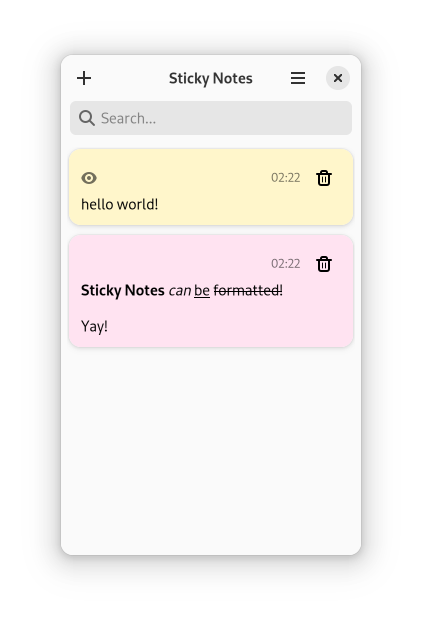
For Linux users seeking a frictionless way to capture fleeting thoughts, the Sticky Notes desktop utility offers an elegant, distraction-free solution. Instead of burying your daily to-do lists, quick reminders, or code snippets inside heavy text editors or complex project management suites, this lightweight application lets you pin digital notes directly to your GNOME workspace. It is designed to do one thing exceptionally well: keep your most critical information immediately visible so you never lose track of your daily priorities.
Essential Features for Daily Productivity
While some productivity tools overwhelm users with unnecessary complexity, the Sticky Notes desktop utility focuses on core usability. The application provides a clean, native experience tailored specifically for the GNOME desktop environment. Here is a breakdown of what makes it a valuable addition to your system:
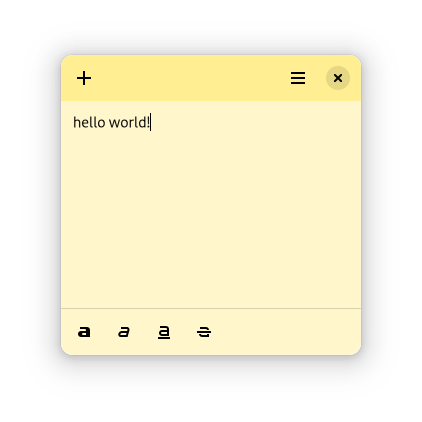
- Rich Text Formatting: Keep your thoughts organized using essential formatting options, including bold text, italics, underlines, and strikethroughs to cross off completed tasks.
- Seamless Session Restoration: You do not have to worry about losing your active reminders. If you close the application or reboot your system, all open notes are automatically restored exactly where you left them.
- Visual Organization: Color-code your notes to categorize different projects, differentiate urgent tasks from general ideas, or simply match your desktop aesthetic.
- Modern Dark Theme Support: Work comfortably at any hour. The application natively supports dark themes, integrating beautifully with modern Linux system settings.
Who is This Tool For?
Developed by Angelo Verlain, this tool is ideal for developers, writers, and multitasking professionals on Linux who need a digital equivalent of physical post-it notes. If you frequently find yourself opening a temporary text document just to paste a link or draft a quick message, this app replaces that clumsy habit with a streamlined, persistent desktop companion.
How to Get Started
If you are ready to declutter your mind and organize your desktop workspace, we highly recommend trying this utility. You can find more information, view user feedback, and access the installation files by visiting the official page on Flathub.
Rate the App
User Reviews










Popular Apps










Editor's Choice